Share the right view
Select the monitors visitors should see, choose public labels and organize components into groups. Keep private URLs and diagnostic details inside your workspace.
 UptimeOwl
A CLEAR VIEW FOR YOUR CUSTOMERS
Give customers one calm place to check the services they rely on. Choose what to share, add your branding and publish considered updates while your team works behind the scenes.
Start with Free. Choose Business or Enterprise to publish a status page.
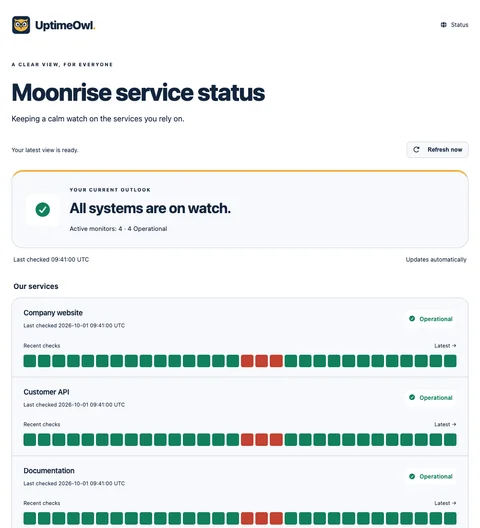
Select the monitors visitors should see, choose public labels and organize components into groups. Keep private URLs and diagnostic details inside your workspace.
Add your logo, colors, introduction and footer. Choose Classic or Recent checks, set a logo link and optionally remove the UptimeOwl attribution.
Publish reviewed incident updates and maintenance notices. Detections can seed private incident drafts; your team decides which wording reaches the public.
A MOMENT FROM EVERYDAY MONITORING
Your customer API is having trouble, but your documentation is healthy. Show them as separate components, publish an update explaining the affected service and follow up as the incident changes. Visitors get context without access to your private detection logs.
Owners and admins manage publication. Save and preview changes before publishing; a saved draft does not silently replace the live page.
FROM FIRST STEP TO STEADY WATCH
Open Status page in your dashboard. Select eligible monitors, write clear public labels and arrange your groups.
Set the title and branding, choose a layout and review the draft. Add translated copy for the languages your audience uses.
Share the hosted workspace URL. Use Incidents and Maintenance for reviewed updates as your service outlook changes.
ROOM FOR YOUR WATCH
One hosted public status page per workspace on Business and Enterprise. Public pages do not use your widget allowance.
Your branding, localized pages, incident updates and maintenance notices.
Business and Enterprise include one hosted public status page per workspace, independently of widget quotas. Owners and admins can manage it.
Not yet. The hosted page uses uptimeowl.online followed by your workspace’s generated identifier. Custom domains and custom URL slugs are not currently offered.
Yes. The page supports English, Greek, Ukrainian, Russian, German, French, Italian, Simplified Chinese, Japanese, Spanish, Romanian and Bulgarian. Localized versions use a language suffix in the URL; the unsuffixed page is English.
The public page uses the selected components and public-facing information. Incident updates are explicitly published; private detections do not automatically become public messages.
Status-page subscriber notifications are not available yet. Workspace notification integrations are separate from public visitor subscriptions.
A HELPING WING
Browse more status pages & widgets guides in the help center.