One gentle ping
One echo request per check, sent to a validated public IPv4 or IPv6 address. No flood mode, port range or application login.
 UptimeOwl
A LITTLE PING. A CLEARER PICTURE.
Sometimes the first question is simple: can this host answer? ICMP monitoring sends a small echo request and keeps watch for a reply, with the same calm alerts as the rest of your nest.
Start free. No card required.
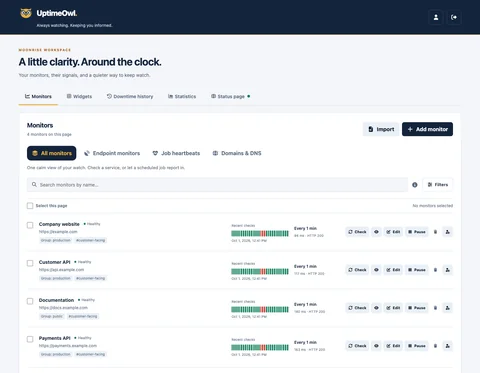
One echo request per check, sent to a validated public IPv4 or IPv6 address. No flood mode, port range or application login.
Choose a timeout and confirmation threshold, so one missed reply need not become an incident.
Use existing permissions, maintenance windows and notification preferences alongside your other monitors.
A MOMENT FROM EVERYDAY MONITORING
A public server stops responding after a network change. Its ICMP monitor misses the expected reply. Once your confirmation threshold is reached, UptimeOwl starts the usual incident and alert flow, giving your team a clear place to begin.
Some healthy hosts block ping. A missing echo reply is evidence of ICMP reachability trouble, not proof that every service on that host is down.
SMALL SIGNALS, EVERYDAY WORK
Keep an authorized public IPv4 or IPv6 server on watch when it is configured to answer ICMP.
Add a reachability signal after network or firewall changes, alongside application checks.
Pair ping with HTTP or TCP checks. Each lookout answers a different question.
FROM FIRST STEP TO STEADY WATCH
Open Endpoint monitors, add a monitor and choose ICMP ping.
Enter icmp:// followed by a public hostname or IP address. Bracket IPv6 literals and select the address family; no port is needed.
Choose a timeout and confirmation rules, then follow incidents through your existing channels.
ROOM FOR YOUR WATCH
Free: 3 monitors, checks from 5 minutes · Starter: 10 monitors, checks from 3 minutes · Team: 30 monitors, checks from 1 minute · Business: 100 monitors, checks from 30 seconds. Enterprise allowances are arranged with Blastup.
Slack, Teams and mobile push on every plan. Monitor email alerts on paid plans.
Yes. It counts toward your monitor allowance and follows your plan’s minimum interval. Monitor email alerts require a paid plan.
No. It only means the selected address answered an ICMP echo request. Use application-specific checks for responses and transactions.
Yes. A host, firewall or provider may block or rate-limit ICMP even while its applications work.
Yes. Choose IPv6 only to check a validated public IPv6 address without IPv4 fallback. Automatic keeps IPv4 for hostnames; bracketed IPv6 literals use IPv6. The monitoring worker needs working IPv6 connectivity.
UptimeOwl preserves the last confirmed status instead of inventing a downtime or recovery event. The monitoring evidence becomes delayed until checks can resume.
A HELPING WING
Browse more monitors & detections guides in the help center.