Copy, embed, keep watch
Choose the monitors for a widget, preview it and copy the iframe code. Add it to a page that supports iframe embeds and your visitors can see the published status.
 UptimeOwl
A LITTLE STATUS, RIGHT WHERE IT HELPS
Put service health where your customers already are. An UptimeOwl widget brings a compact, branded view of selected monitors into your website without building a status interface from scratch.
Start free. No card required.
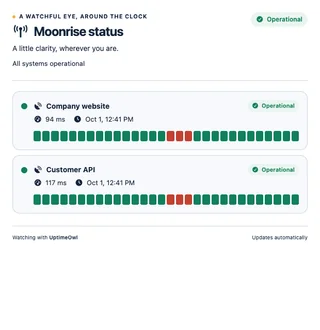
Choose the monitors for a widget, preview it and copy the iframe code. Add it to a page that supports iframe embeds and your visitors can see the published status.
Choose colors, upload your logo and write your own heading and subheading. Branding is available on every plan, including Free.
Business and Enterprise add localized widget text. Select a language, preview the result and copy the embed code with that locale already included.
A MOMENT FROM EVERYDAY MONITORING
A customer visits your support page to ask whether a service is down. Embed a widget showing your customer portal and public API beside the support information. They can check availability without leaving the page or opening your private dashboard.
Paused monitors and their recent downtimes are excluded from the public widget. Keep public names and wording suitable for everyone who can view the embed.
FROM FIRST STEP TO STEADY WATCH
Create a widget in the Widgets tab and select the monitors your audience needs to see.
Add a logo, colors and heading. On Business or Enterprise, select a locale and adjust its wording.
Open the preview, copy the supplied iframe code and paste it into your website. Check the result at desktop and mobile widths.
ROOM FOR YOUR WATCH
Free: 1 widget · Starter: 3 widgets · Team: 10 widgets · Business: 25 widgets. Enterprise allowances are arranged with Blastup.
Logo, colors and custom headings on every plan. Multilingual widgets on Business and Enterprise.
Yes. Free includes a branded widget. Higher plans increase widget allowances, while Business and Enterprise also include multilingual widgets.
No UptimeOwl plugin is required. Use the supplied iframe embed code in a website or CMS that permits iframes. Your platform’s embedding and security rules still apply.
A widget sits inside your own page and shares selected monitor status. A hosted status page has its own public URL, grouped components, published incident updates and maintenance notices. Hosted pages require Business or Enterprise.
On Business or Enterprise, select the desired locale when copying each embed. The locale in the iframe URL determines the language of that instance. English is available on every plan.
Yes. The copied iframe starts at full width with a minimum height. Adjust the embed dimensions for your layout and test it on small screens so visitors can read the full widget.
A HELPING WING
Browse more status pages & widgets guides in the help center.