A live view of your watch
See monitor status, response times and recent checks. While the app is connected, monitor changes and detections arrive without pulling to refresh; reconnecting refreshes the view.
 UptimeOwl
A LITTLE OWL IN YOUR POCKET
Step away from your desk without losing the picture. Follow monitor status, recent checks and detections in the UptimeOwl companion app, and enable push notifications for a nudge when an accessible monitor goes down or recovers.
Start free. No card required.
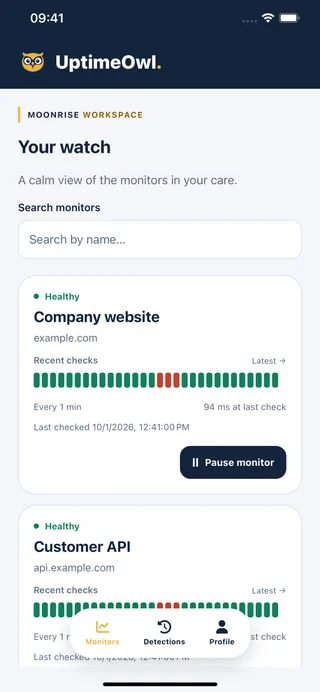
See monitor status, response times and recent checks. While the app is connected, monitor changes and detections arrive without pulling to refresh; reconnecting refreshes the view.
Enable downtime and recovery push alerts for each device. Distinct alert sounds help tell the two apart, while respecting the device’s notification and sound settings.
Owners and admins can pause or resume monitors they are permitted to manage from lists or details. Viewers remain read-only. Full configuration and billing stay on the website.
A MOMENT FROM EVERYDAY MONITORING
You follow the same workspace on a phone and a tablet. Enable push on the device you carry, or on both if that suits your day. Each signed-in device keeps its own preference, so quieting one device does not switch notifications off on the other.
Live updates while the app is connected and background push are different paths. Push requires successful registration, device permission and an available delivery service; it is not a guarantee of immediate delivery.
FROM FIRST STEP TO STEADY WATCH
Install UptimeOwl from the App Store or Google Play. Request a sign-in link from the app and follow the email.
Open Profile → Notifications, turn on Mobile push and complete any permission prompt. Wait for confirmation that the device is ready.
Use Monitors and Detections for the current picture. Open a monitor for more context, and use pause/resume only where your role and permissions allow it.
ROOM FOR YOUR WATCH
Mobile monitoring and push notifications are available on every plan, including Free. Each device needs its own completed notification setup.
Your existing workspace permissions apply. Available on iOS and Android.
UptimeOwl is available for iOS on the App Store and Android on Google Play. Use the download links on this page to find the app.
Yes. Mobile monitor alerts are available on every plan, subject to your access to the monitor and successful device setup. Browser web push and SMS are not available yet.
Yes. Each signed-in device has its own registration and notification preference. Enable the devices you want to receive alerts and confirm that each one is ready.
Email clients and device link handling can affect which app opens a link. If necessary, use the mobile app’s manual link-entry option. Keep sign-in links private.
The app supports viewing your watch and permission-controlled quick pause/resume. Other monitor settings, widgets, workspace members and billing are managed on the UptimeOwl website.
No. Device notification permissions, notification-channel settings, silent mode and focus settings can affect whether you hear an alert. UptimeOwl does not promise to override them.
A HELPING WING
Browse more mobile companion guides in the help center.